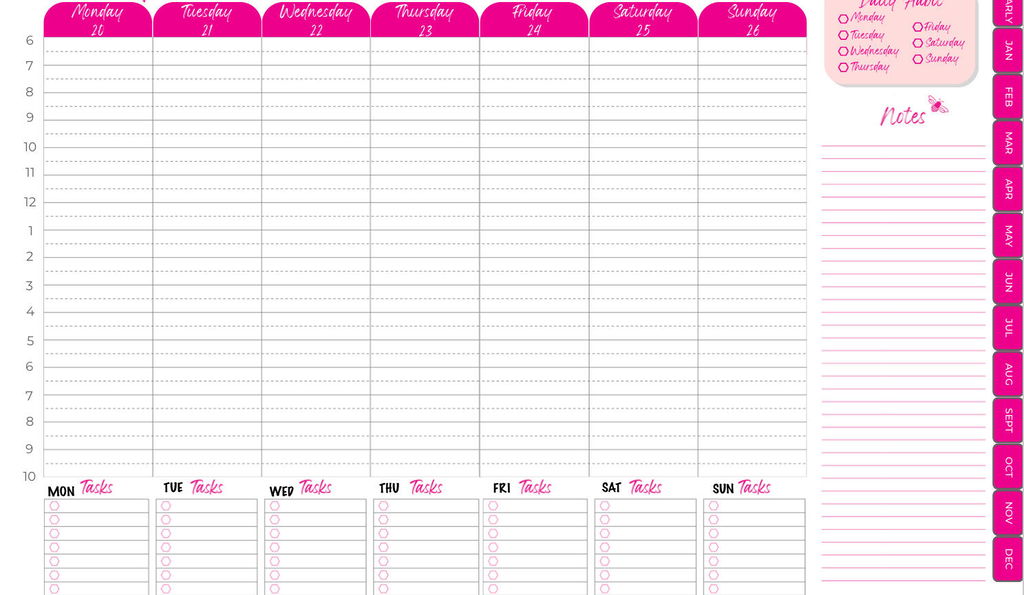
Digital TOP Planner for July 2026 - June 2027
Digital TOP Planner for July 2026 - June 2027
This is the digital version of The TOP Planner. Twelve months of weekly and monthly layouts, July 2026 through June 2027, as an editable PDF that lives right on your tablet.
If you'd rather carry your planner on a device you already have than add another notebook to your bag, this is the format for you!
What a Digital Planner Actually Is
This is the full TOP Planner as an editable PDF that lives on your tablet. You write on it with your stylus, exactly like you would on paper, or you can type on it if you connect a keyboard. What it is not is software. It won't talk to your Google Calendar or your iCal. Think of it as an entire paper planner tucked inside your tablet.
What You Need
A tablet and a stylus, like an Apple Pencil. Apple and Android both work.
Highly Portable
Your whole planner goes wherever your tablet goes, and you can open it without wi-fi.
Fun to Use
Pick your writing colors, add digital stickers, drop in your own images. Make it look like yours.
Setup Course Included
Getting a PDF onto a tablet isn't always obvious, so we don't leave you guessing. The minute you buy, you get access to a short course where we walk you through loading it on an Apple or Android tablet, plus a few tips and tricks for using it well.
The Version You're Getting
This is the July 2026 through June 2027 planner. We release a new dated version every six months, so you can jump in whenever you're ready instead of waiting for January.
Couldn't load pickup availability
Share


I've been trying to use my ipad more, so this year I opted for a digital planner instead of paper. I use notability for all my pdf editing and this works seamlessly with that app. I like the convenience of the links to be able to navigate to specific months and even weeks from anywhere in the planner. I also love that the year and the weeks are set up as Monday starts since that's a non-negotiable for me. My only complaint is that the months are set up as Sunday starts. This is very confusing for me, so I had to re-design each month for the weeks to start on Monday. I really hope for future years that this can either be updated to match the weeks and year view or that both a Sunday start and Monday start option can be offered.
I have only have only been using my planner a couple weeks and already I am feeling much less stressed. Would definitely recommend the TOP program along with One Notebook.
Surprised to see this was a January to December calendar. The one I purchased last year was July 2024 to June 2025. So I'm not getting six months of use out of my old calendar.
I'm also disappointed that this planner no longer has the look of a physical planner with the spiral rings in the middle. Without that divider, it's hard to know what day of the week it is and the time when you are scheduling things later in the week. As a result, I've resorted to putting the days of the week for each task column so that I don't have to keep scrolling up on my iPad to make sure I'm on the right day. It is my hope that for 2026, the planner design goes back to having the spiral rings in the middle and the times for the later in the week days to make planning easier and more like a paper planner.